Description
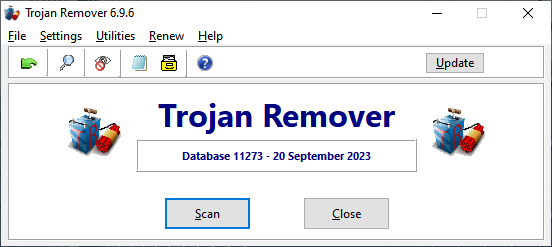 Trojan Remover aids in the removal of Malware — Remote Access Trojans, Backdooors, Worms, Adware, Spyware
and other malicious programs - when standard anti-virus
software either fails to detect them or fails to effectively eliminate them. It is designed specifically to disable
and remove Malware without requiring the user to manually edit system files or the Windows Registry. It also
removes additional system modifications that some Malware leaves behind. The program runs on all versions of
Windows from Windows 7(SP1) and upwards.
Trojan Remover aids in the removal of Malware — Remote Access Trojans, Backdooors, Worms, Adware, Spyware
and other malicious programs - when standard anti-virus
software either fails to detect them or fails to effectively eliminate them. It is designed specifically to disable
and remove Malware without requiring the user to manually edit system files or the Windows Registry. It also
removes additional system modifications that some Malware leaves behind. The program runs on all versions of
Windows from Windows 7(SP1) and upwards.
Note: clicking on any of the thumbnail images will show the matching full size images.
What Trojan Remover Does
 When launched the main Trojan Remover program examines all system files and programs loaded at boot time,
scanning for Adware, Spyware, Remote Access Trojans, Internet Worms, and other threats. The scan also checks for
Potentially Unwanted Software, such as fake anti-malware or Cleaner programs which show false detection
information in an attempt to get the User to pay a fee for cleaning their system when there is nothing
wrong with it.
When launched the main Trojan Remover program examines all system files and programs loaded at boot time,
scanning for Adware, Spyware, Remote Access Trojans, Internet Worms, and other threats. The scan also checks for
Potentially Unwanted Software, such as fake anti-malware or Cleaner programs which show false detection
information in an attempt to get the User to pay a fee for cleaning their system when there is nothing
wrong with it.
Trojan Remover's scan can detect malicious services hidden by Rootkit techniques to avoid normal detection,
and scans the Windows Registry for malware loading onto the system by other methods.
A progress screen is shown itemising the system areas being scanned.
 When a malware file is detected or Trojan Remover identifies a suspicious entry or file,
an alert will be shown. This alert will provide details of the detection, with a link to the Malware
Information database to show more details where possible.
When a malware file is detected or Trojan Remover identifies a suspicious entry or file,
an alert will be shown. This alert will provide details of the detection, with a link to the Malware
Information database to show more details where possible.
The alert screen will offer options to remove or rename the threat. There is usually also the option to
exclude the detection from future alerts, if the User is satisfied that the file or entry being alerted
on is trusted by them.
 Trojan Remover also scans other elements of the system, such as Internet Browser Extensions (or Add-Ons),
Proxy Servers, and DNS Settings. A number of heuristic checks are also carried out to look for malware
not detected by conventional methods.
Trojan Remover also scans other elements of the system, such as Internet Browser Extensions (or Add-Ons),
Proxy Servers, and DNS Settings. A number of heuristic checks are also carried out to look for malware
not detected by conventional methods.
Any issues detected will be alerted on so the User can take the necessary action to resolve the issue.
 Trojan Remover can be used to scan individual drives or folders on demand, giving the User flexibility in how
to check for threats. This function is useful for scanning new software downloaded before running it. The
program integrates with Windows Explorer so that a file or a folder can be scanned by right-clicking on it
and selecting the option to Scan with Trojan Remover. As with the main scan these individual scans when run
will show alerts on anything malicious or suspicious detected, with options to remove, rename or exclude.
Trojan Remover can be used to scan individual drives or folders on demand, giving the User flexibility in how
to check for threats. This function is useful for scanning new software downloaded before running it. The
program integrates with Windows Explorer so that a file or a folder can be scanned by right-clicking on it
and selecting the option to Scan with Trojan Remover. As with the main scan these individual scans when run
will show alerts on anything malicious or suspicious detected, with options to remove, rename or exclude.
During a folder scan, if there are a number of files to scan or subfolders are also being scanned, the scan
screen will show the progress of the scan with the expected completion time. It will also show how many files
have been scanned and how many malicious or suspicious items have been detected.
 Trojan Remover comes with an automatic Updater program which keeps both the program files and the malware
databases up to date. The User has complete control over how the updates are delivered.
Trojan Remover comes with an automatic Updater program which keeps both the program files and the malware
databases up to date. The User has complete control over how the updates are delivered.
During the intitial
installation scheduled tasks are created to update both the malware definitions and the program files
automatically. These settings can be modified in the main Trojan Remover program, where - for example - you
can opt to receive malware definitions automatically, but be prompted for any program file update that is
available, so that you can decide to install such updates at a time of your choosing.
If required all
automated updates can be disabled and updates are then only offered when you select Update in the main
Trojan Remover program, or run the separate Updater program directly.
 FastScan mode quickly checks critical areas of your system at every startup, providing early detection of active malware threats.
It can also be scheduled to run daily at a time of your choosing, useful for those Users who do not
regularly turn their systems off. This is the default configuration when Trojan Remover is installed,
with the time the scan is run set randomly. The time this daily scan is run can be configured in the
main Trojan Remover program.
The FastScan can be set to run in silent mode, only becoming visible - and showing an alert - if something suspicious is detected.
 The FastScan can run in a minimised format showing less detail, if you wish to see the scan running but don't need the detailed output.
This setting is toggled by the simple More Info/Less Info button on the scan screen. When running in the minimised
format the scan takes up less resources and allows the User to get on with what they want to do, whilst still being informed of the scan's progress.
The FastScan can run in a minimised format showing less detail, if you wish to see the scan running but don't need the detailed output.
This setting is toggled by the simple More Info/Less Info button on the scan screen. When running in the minimised
format the scan takes up less resources and allows the User to get on with what they want to do, whilst still being informed of the scan's progress.
Other Features
FastScan: Automatically checks for active malware at every startup and runs daily at the User's chosen time. Can be scheduled manually.
Scanning: Complete right-click integration with Windows Explorer for scanning files, folders, or entire drives.
Updating: Built-in Updater for program and database updates, including scheduled daily checks.
Help: A full help file is included, also available online.
You can view the latest changes here.
Evaluation
You can try Trojan Remover FREE for 30 days. This is a fully functional version of the program with no restrictions. Download Evaluation Copy
Registration
First year registration is US$26.95, with subsequent renewals at US$19.95 (excluding local taxes). One license covers installation on up to 4 systems.


